ACORD forms that fill themselves
Drop in any source document and watch the right ACORD form populate field by field. 20+ commercial forms supported, including COIs, Workers Comp, GL, Commercial Property, Auto, Umbrella, Crime, Bonds, and Cancellation requests.
Multi-form batch fill in one pass.
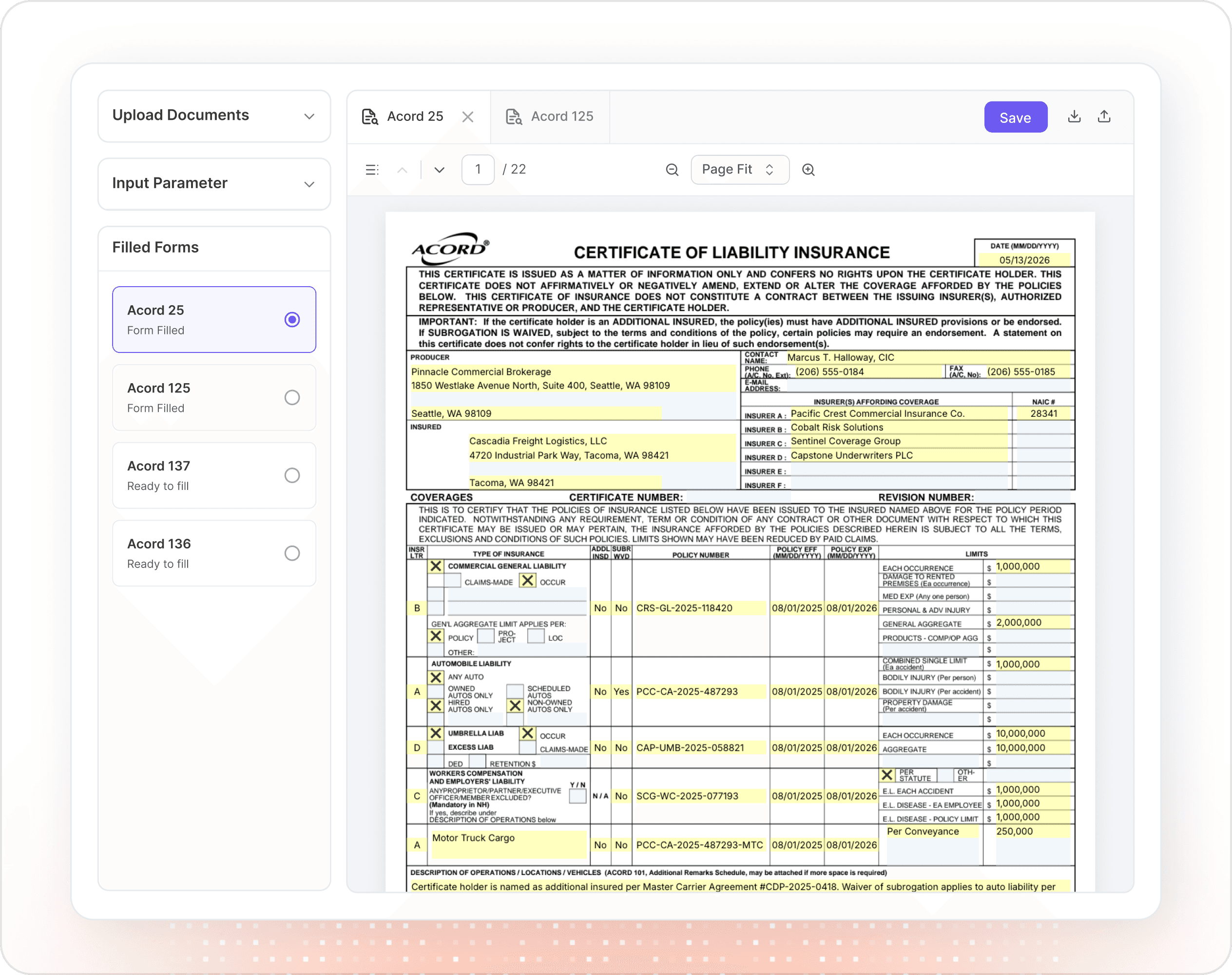
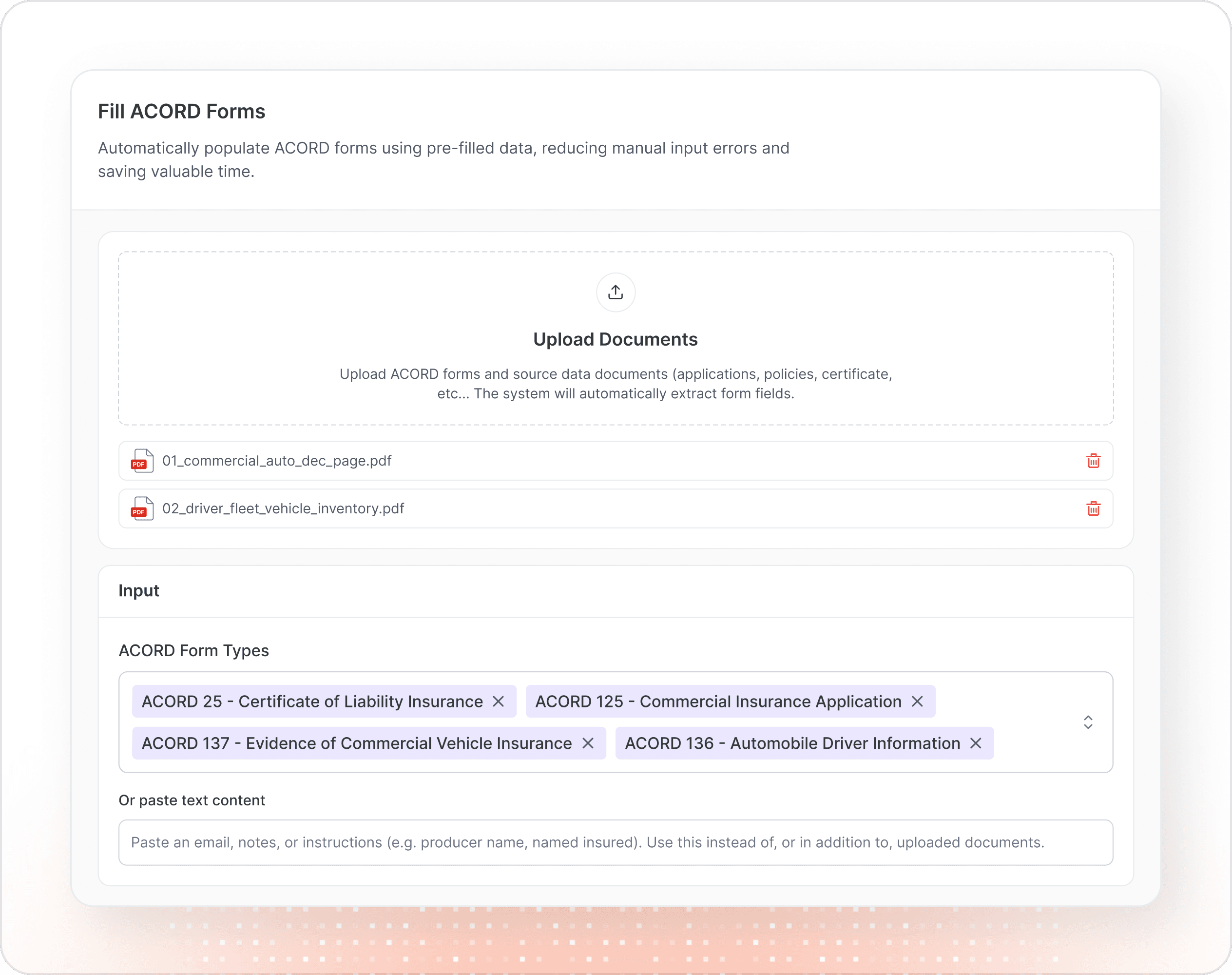
Select multiple ACORD forms at once, and the AI populates all of them in parallel from a single upload. Named insureds, producer details, and policy data automatically share across forms. Extract once, fill many.
Multi-form batch fill in one pass.
Select multiple ACORD forms at once, and the AI populates all of them in parallel from a single upload. Named insureds, producer details, and policy data automatically share across forms. Extract once, fill many.
In-browser PDF editing with live highlights.
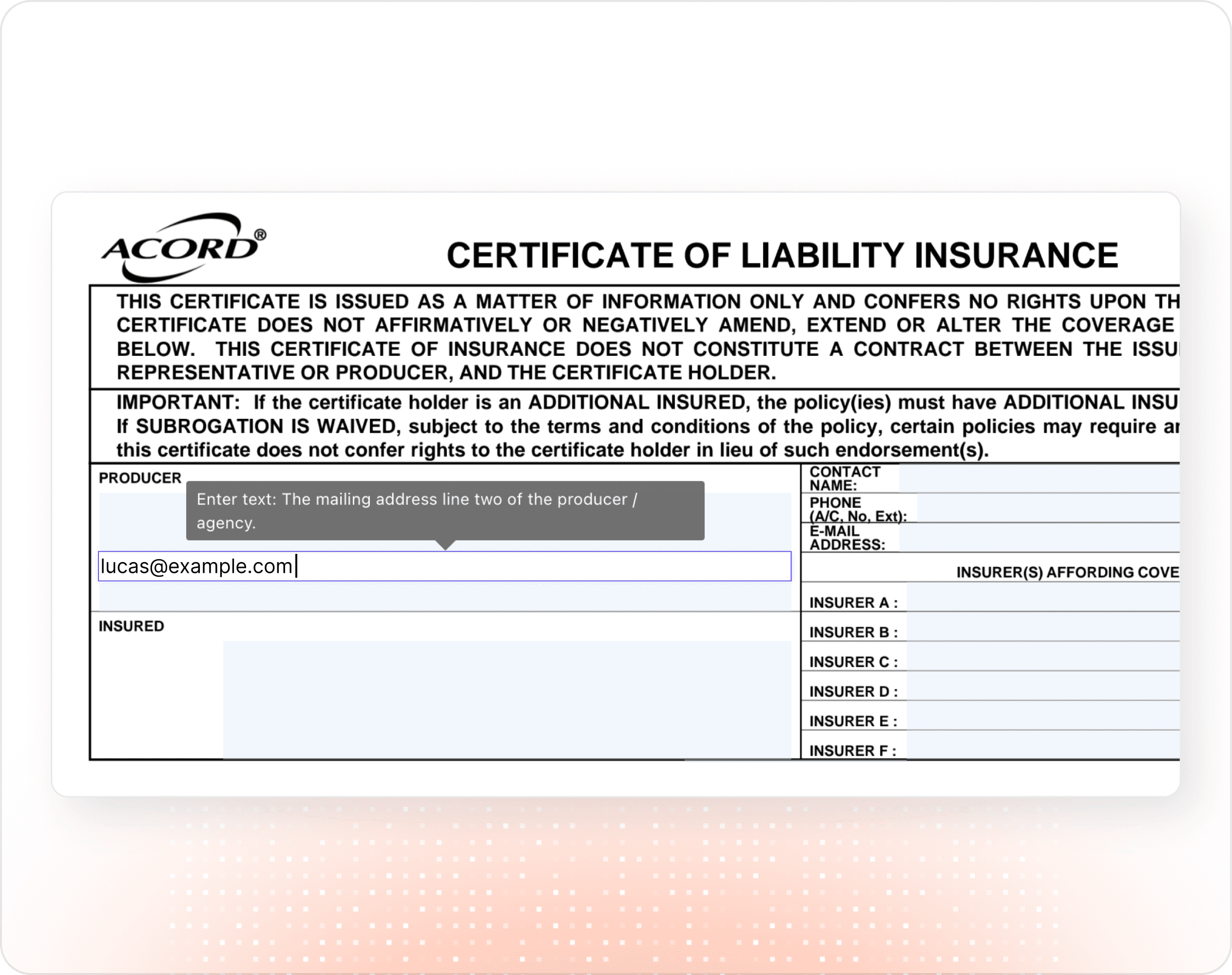
Every extracted value is editable directly on the form. Filled fields are highlighted yellow; empty fields are light blue, so reviewers know exactly what to verify. Changes autosave every 30 seconds. Close the tab and pick up right where you left off.
In-browser PDF editing with live highlights.
Every extracted value is editable directly on the form. Filled fields are highlighted yellow; empty fields are light blue, so reviewers know exactly what to verify. Changes autosave every 30 seconds. Close the tab and pick up right where you left off.
One-click signature stamping.
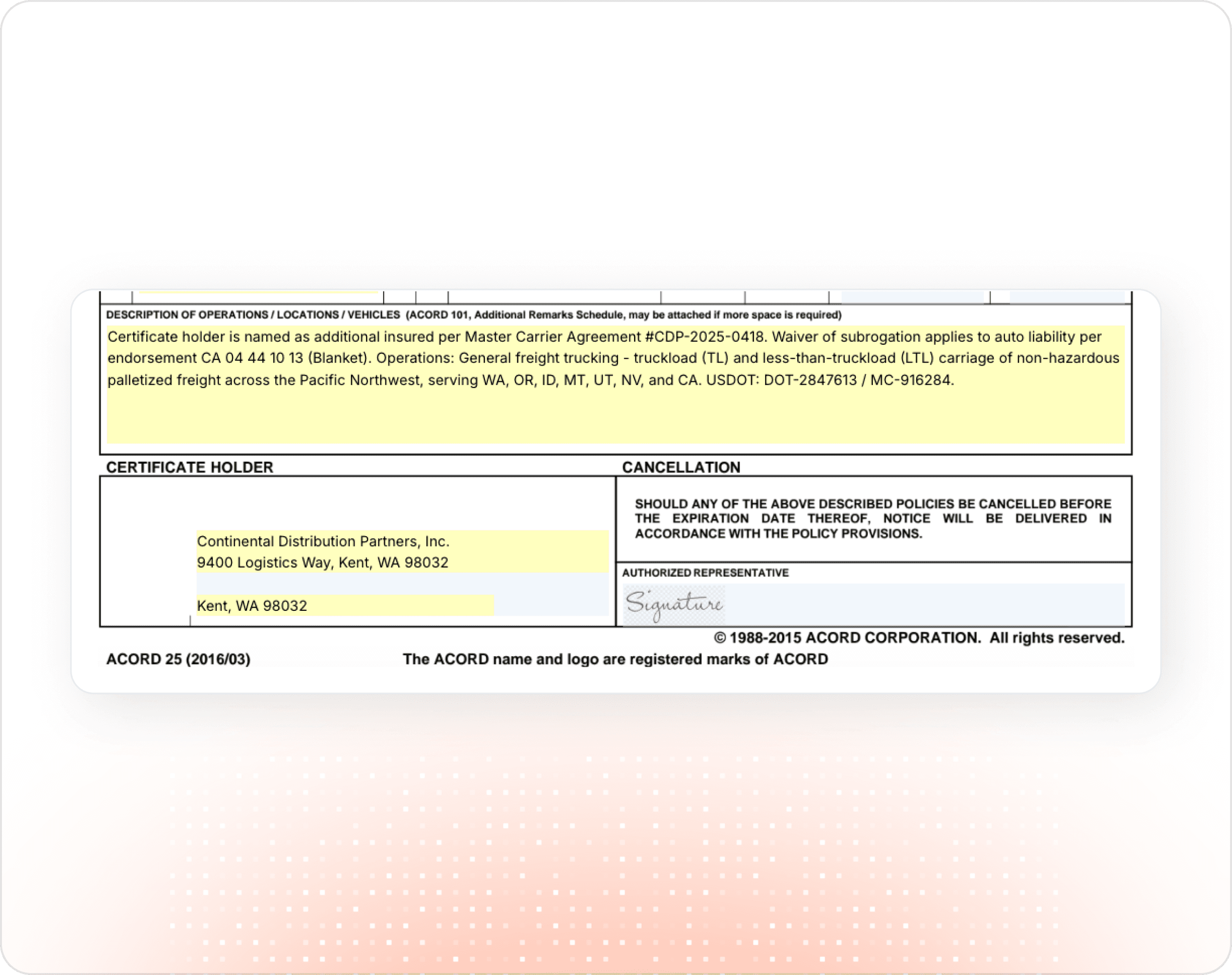
Upload your authorized representative's signature once (PNG or JPEG). It auto-stamps onto every ACORD form's signature field. Org admins can set a shared default for the whole agency.
One-click signature stamping.
Upload your authorized representative's signature once (PNG or JPEG). It auto-stamps onto every ACORD form's signature field. Org admins can set a shared default for the whole agency.
Editable PDF export & native AMS integration.
Download forms individually, or merge several ACORDs into a single PDF with drag-to-reorder. All downloads remain fully editable in Adobe/Acrobat. Push completed forms directly into Applied Epic (with AMS360 and Nexsure on the roadmap), no re-keying required.
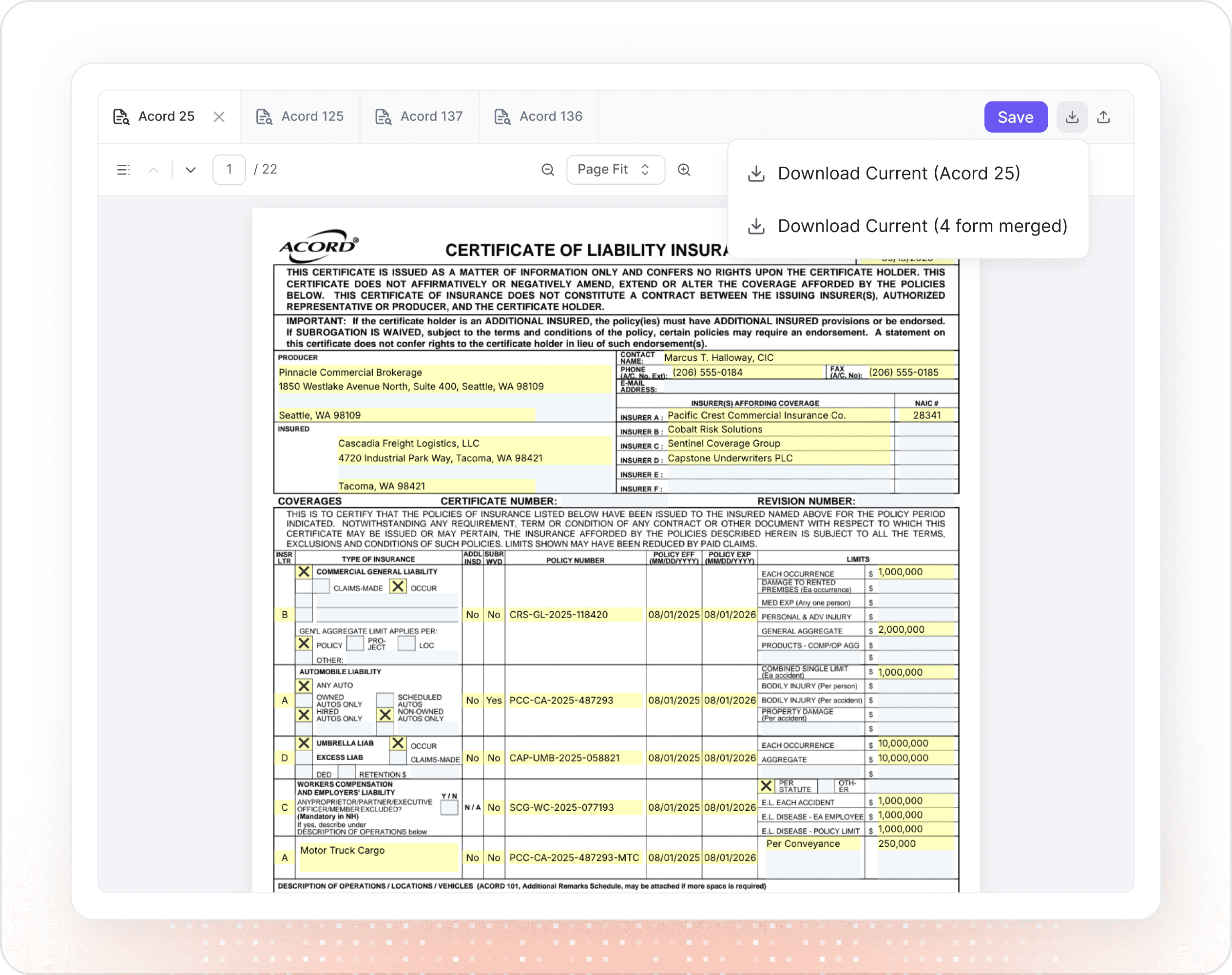
Editable PDF export & native AMS integration.
Download forms individually, or merge several ACORDs into a single PDF with drag-to-reorder. All downloads remain fully editable in Adobe/Acrobat. Push completed forms directly into Applied Epic (with AMS360 and Nexsure on the roadmap), no re-keying required.
Common questions
Which documents can I use as input?
Any combination of PDFs, Word documents, scanned images (PNG/JPEG/TIFF), or pasted text from emails and applications. The AI extracts and structures data regardless of format. You don’t need to clean or reformat anything first.
How accurate is the extraction, and can I correct mistakes?
The AI handles the heavy lifting, but every field stays editable. Click any field on the PDF to update it inline. Edits autosave every 30 seconds and persist across sessions, so reviewing and refining is part of the workflow, not a separate step.
Which ACORD forms are supported?
Over 20 of the most-used commercial forms, covering Workers Compensation, Certificates of Insurance, General Liability, Commercial Property, Commercial Auto, Umbrella & Excess, Inland Marine, Crime, Bonds, Statement of Values, and Cancellation / Agent-of-Record requests. More forms are added regularly.
Can I send completed forms to my agency management system?
Yes. Applied Epic is supported today via direct integration. Completed forms export as editable PDFs (so carrier portals can still update them) and attach as separate documents per form. AMS360 and Nexsure support are in progress.
Do I have to sign every form manually?
No. Upload your signature image once in user preferences, and Outmarket stamps it on the Authorized Representative field of every ACORD form automatically. Agency admins can configure a default signature for the whole organization.
Common questions
Which documents can I use as input?
Any combination of PDFs, Word documents, scanned images (PNG/JPEG/TIFF), or pasted text from emails and applications. The AI extracts and structures data regardless of format. You don’t need to clean or reformat anything first.
How accurate is the extraction, and can I correct mistakes?
The AI handles the heavy lifting, but every field stays editable. Click any field on the PDF to update it inline. Edits autosave every 30 seconds and persist across sessions, so reviewing and refining is part of the workflow, not a separate step.
Which ACORD forms are supported?
Over 20 of the most-used commercial forms, covering Workers Compensation, Certificates of Insurance, General Liability, Commercial Property, Commercial Auto, Umbrella & Excess, Inland Marine, Crime, Bonds, Statement of Values, and Cancellation / Agent-of-Record requests. More forms are added regularly.
Can I send completed forms to my agency management system?
Yes. Applied Epic is supported today via direct integration. Completed forms export as editable PDFs (so carrier portals can still update them) and attach as separate documents per form. AMS360 and Nexsure support are in progress.
Do I have to sign every form manually?
No. Upload your signature image once in user preferences, and Outmarket stamps it on the Authorized Representative field of every ACORD form automatically. Agency admins can configure a default signature for the whole organization.
Common questions
Which documents can I use as input?
Any combination of PDFs, Word documents, scanned images (PNG/JPEG/TIFF), or pasted text from emails and applications. The AI extracts and structures data regardless of format. You don’t need to clean or reformat anything first.
How accurate is the extraction, and can I correct mistakes?
The AI handles the heavy lifting, but every field stays editable. Click any field on the PDF to update it inline. Edits autosave every 30 seconds and persist across sessions, so reviewing and refining is part of the workflow, not a separate step.
Which ACORD forms are supported?
Over 20 of the most-used commercial forms, covering Workers Compensation, Certificates of Insurance, General Liability, Commercial Property, Commercial Auto, Umbrella & Excess, Inland Marine, Crime, Bonds, Statement of Values, and Cancellation / Agent-of-Record requests. More forms are added regularly.
Can I send completed forms to my agency management system?
Yes. Applied Epic is supported today via direct integration. Completed forms export as editable PDFs (so carrier portals can still update them) and attach as separate documents per form. AMS360 and Nexsure support are in progress.
Do I have to sign every form manually?
No. Upload your signature image once in user preferences, and Outmarket stamps it on the Authorized Representative field of every ACORD form automatically. Agency admins can configure a default signature for the whole organization.

Ready to Transform Your Agency?
Ready to Transform Your Agency?
Ready to Transform Your Agency?
The #1 AI platform for insurance. 250+ agencies. Purpose-built workflows. Enterprise security.
The #1 AI platform for insurance. 250+ agencies. Purpose-built workflows. Enterprise security.
The #1 AI platform for insurance. 250+ agencies. Purpose-built workflows. Enterprise security.
Platform